|


| |
Contents | Index
X-bar / Sigma Chart & Statistics Window
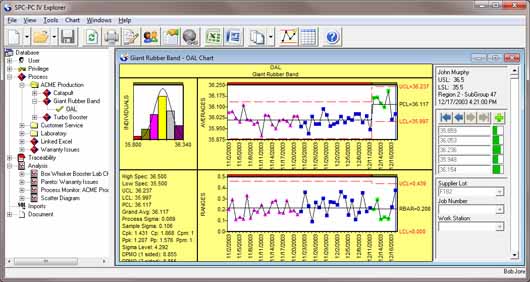
The X-bar / Sigma Chart Window displays a control chart based on the subgroup
averages (X-bar) and a control chart based on the subgroup standard deviations
(Sigma).
See also:
SPC Concepts : for related When To Use and Interpreting topics
To Create an X-bar / Sigma Chart
General Chart Features
The following analysis results are displayed in the X-bar / R Chart &
Statistics Windows:
No. The sequential number of the subgroup. Groups with less than two
observations will not appear.
Columns 1 through the subgroup size. Each column contains an observation in the subgroup. Each row will contain
one subgroup. Missing data is indicated by a blank field.
Note: If entries are made in the Short Run Options dialog box, the values
listed are the standardized observations.
Average (Mean) . The average of all observations in the subgroup.
Sigma . The subgroup standard deviation.
Warning: If a group is out of control it will be marked with an asterisk immediately
after the Sigma value.
Below the table, is a listing of the options used in the analysis.
Group Range: Indicates the groups selected for analysis, as specified in the Chart Options
dialog box. If Auto Drop is ON, groups that were out of control were also
excluded from the analysis. A list of dropped groups is provided at the bottom of
the window.
Auto Drop option: This option is ON if the Auto Drop check box in the Analysis Options dialog
box has been selected. The default for this option is the OFF setting.
Auto Fold option: This option is ON if Folded Normal Curve in the Analysis Options dialog box has been selected.
Any negative values will be considered the absolute value of the measurement.
The control chart values are presented for each control region (if multiple
regions specified in the Stepped Control Limits dialog box):
X-Bar Chart Calculations
Sigma Chart Calculations
Note:
- The value 3 in the Control Limit equations is replaced by the specified value
of the control limit ordinate set in the Analysis Options.
- If standardization using a dispersion estimate is entered in the Short Run
Options, the center line of the X-bar chart will be at zero, and the average line
of the Sigma chart at one, regardless of the calculated average
and average sigma of the standardized variable..
Sigma: The process sigma of the subgroups selected for analysis.
Note: This is the standard deviation of the observations, NOT the standard
deviation of the subgroup averages, which is calculated by dividing the standard
deviation of the observations by the square root of n (the subgroup size).
Center (PCL) : the midpoint of the calculated (or specified) control limits:
Note: if Stepped Control Limits are NOT used and Auto Drop is OFF, then the
PCL will equal the Average.
The Statistics window also provides a summary of various statistics and
options used in the analysis:
Control Limits based on: the method of calculation for the control limits, as specified in the Stepped
Control Limits dialog box.
Control Limits shown for complete groups of size n, as specified in the Chart Options dialog box.
There were p observations out of control: provides a count of out of control groups.
Run Tests: If any subgroups violated the selected run tests, a table is provided listing
the subgroup number and the run test violated. You may view and select the run
tests that are applied by selecting Run Tests from the Options menu.
Dropped Groups: If Auto Drop is on, and the control limits were calculated by the software, a
list of groups is provided which were out of control and subsequently dropped
from analysis.
If Short Run Options have been entered, the following is also shown:
A note will indicate the standardization method used (calculated or entered).
A note will indicate how dispersion was specified.
Following this description is a table listing the
Run: The run number.
MEAN: The mean value used for standardizing the run, as entered by the user or
calculated, based on settings in the Analysis Options dialog box
RANGE: The Range value used for standardizing the run, as entered by the user or
calculated, based on settings in the Short Run dialog box.
Label: The label used to identify the run. If you have selected Match runs with common indicator column, then the run will include all runs matching the specified indicator for that
run.
|