|


| |
Contents | Index
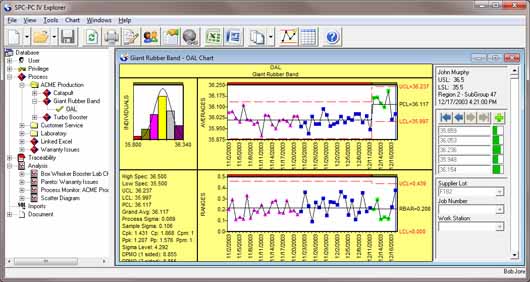
Process Capability Chart & Statistics Windows
The Process Capability Chart Window displays a histogram of the observations
in the selected subgroups, with a distribution curve overlay.
See also:
SPC Concepts : for related When To Use and Interpreting topics
To create a Process Capability Chart
General Chart Features
The following analysis results are displayed in the Process Capability Chart &
Statistics Windows:
Total number analyzed. The number of observations included in the analysis.
Group Range. The subgroups selected for analysis, as specified in the Chart Options dialog
box.
Smallest value. The minimum observation value within the range.
Largest value. The maximum observation value within the range.
Average . The average of all observation values selected for analysis, excluding out of
control points (if Auto Drop is ON).
Process sigma. The standard deviation of the process, based on the control chart estimates
of the variation.
- If subgroup size = 1: see Process Sigma based on Moving Range chart
- If subgroup size > 1: see Process Sigma based on Sigma chart
Population sigma The standard deviation of the population from which the sample was drawn,
based on the subgroups selected for analysis.
Sample sigma The standard deviation of the samples drawn from the population.
Standard error of mean Used as an indication of the reliability of x-bar as an estimate of the mean
of the population. Smaller numbers mean the estimate of the population average
has less variability.
Skewness A measure of the symmetry of a distribution around its mean. Positive values
indicate a shift or tail to the right; negative values indicate a shift or tail
to the left. Skewness is 0 for a normal distribution.
Kurtosis A measure of the flatness or peaked-ness of a distribution. Kurtosis is 0 for
a normal distribution. Values greater than 0 mean the distribution has more
of a peak than a normal distribution. Values less than 0 mean the distribution
is flatter than a normal distribution.
Below the summary statistics is a table pertaining to the scaling used for the
histogram.
Cell. The number of the cell starting at the lowest value. Each bar on the
histogram is referred to as a cell. The number of cells, and the size (width) of each
cell affects the appearance of the histogram, and influences your perception
of the "shape" of the distribution. Statistical guidelines for constructing
histograms, based on the number of observations, are available in most statistical
quality control textbooks. We recommend you select Auto scale in the Analysis Options dialog box to automatically set the cell size based
on these recommendations.
Count. The number of values falling within that cell.
Cell Boundaries. The upper and lower values marking the edges of the cell.
The Capability Analysis is provided at the sigma (ordinate) level specified in
the Analysis Options dialog box. If any of the non-normal curve fits are
selected in Analysis Options, both the non-normal and normal indices are shown for
comparison.
Nominal. The nominal value, if entered in the Analysis Options. This value, if
entered, is used for calculation of Cpm; otherwise, the midpoint of the lower and
upper specifications is used.
Low Spec. The low specification, if entered in the Analysis Options dialog box. The
number of values found below the specification is reported to the right.
High Spec. The high specification, if entered in the Analysis Options dialog box. The
number of values found above the specification is reported to the right.
If there were any values reported beyond the specifications, the total number
of values is reported here.
Cp index (Displayed if both a High and Low Spec have been entered in the Analysis
Options dialog box)
Note:
- If the Sample or Population option is selected in the Sigma for Process Capability option group in the Analysis Options dialog box, then the ratio is referred to
as Process Performance , and denoted as Pp.
- If a value has been entered as Capability Interval Limits in the Analysis
Options dialog box, the Confidence Limits will be provided
Cr index (Displayed if both a High and Low Spec have been entered in the Analysis
Options dialog box) A measure of the percentage of the tolerance actually used by
the process. Smaller numbers are best.
Note: If the Sample or Population option is selected in the Sigma for Process Capability option group in the Analysis Options dialog box, then the ratio is referred
to as Process Performance, and denoted as Pr .
Cpm index. (Displayed if both a High and Low Spec have been entered in the Analysis
Options dialog box) A measure similar to the Cp index that also takes into account
variation between the process average and a target value. If the process
average and the target are the same value, Cpm will be the same as Cp. If the
average drifts from the target value, Cpm will be less than Cp.
Note:
- If the Sample or Population option is selected in the Sigma for Process Capability option group in the Analysis Options dialog box, then the ratio is referred to
as Process Performance, and denoted as Ppm .
- If a value has been entered as Capability Interval Limits in the Analysis
Options dialog box, the Confidence Limits will be provided, enclosed within parentheses.
Zl index (Cpl). (Displayed if a Low Spec has been entered in the Analysis Options dialog
box) An intermediate index needed to compute Cpk. A value greatly different from
the Zu index means the process is not centered.
Note: If the Sample or Population option is selected in the Sigma for Process Capability option group in the Analysis Options dialog box, then the ratio is referred to
as Process Performance, and denoted as Ppl.
Zu index (Cpu). (Displayed if a High Spec has been entered in the Analysis Options dialog
box) An intermediate index needed to compute Cpk. A value greatly different from
the Zl index means the process is not centered.
Note: If the Sample or Population option is selected in the Sigma for Process Capability option group in the Analysis Options dialog box, then the ratio is referred to
as Process Performance, and denoted as Ppu.
Cpk index. A measure of both process dispersion and its centering about the average.
Note:
- If the Sample or Population option is selected in the Sigma for Process Capability option group in the Analysis Options dialog box, then the ratio is referred to
as Process Performance, and denoted as Ppk .
- If a value has been entered as Capability Interval Limits in the Analysis
Options dialog box, the Confidence Limits will be provided
Process. A statement indicating whether the process is capable or not based on the
Cpk. Although subjective, these values have been accepted by most industries.
Cpk < 1.00 Process not capable
- 00 <= Cpk < 1.33 Process is marginal
Cpk >= 1.33 Process is capable.
% LOW. The percentage of the distribution below the lower specification limit, based on the fitted curve. Even if there are no observations beyond the specification, the
distribution predicts that the process will eventually produce observations beyond the
limit if it continues to operate at this level.
% HIGH. The percentage of the distribution above the upper specification limit, based on the fitted curve. Even if there are no observations beyond the specification, the
distribution predicts that the process will eventually produce observations beyond the
limit if it continues to operate at this level.
% OUT. The sum of the percent above the upper specification and the percent below
the lower specification.
The Statistics window also provides a summary of various statistics and
options used in the analysis:
Curve Fit, as specified in the Analysis Options dialog box.
K-S Test : The Kolmogorov-Smirnov goodness of fit test is reported, which indicates how
well the fitted curve actually matches the data (Massey, 1951).
- If K-S < 0.05: "Lack of fit is significant".
- If K-S > 0.05: "Lack of fit is not significant"
Detailed output for Process Capability Printouts also includes:
Summary data
Count of dropped groups. Total number of groups that were dropped if Auto Drop was selected in the
Analysis Options dialog box.
Overall range. The difference between the largest and smallest value found in the range.
Performance statistics
- 3 sigma. The value at 3 s below average.
+ 3 sigma. The value at 3 s above average.
- k sigma. The value at k sigma below the average, where k is the control limit
ordinate, as entered in the Analysis Options. If k=3 is entered in the Analysis
Options (or defaulted to), then k=4 will be reported here, since the k=3 value is
reported above.
+ k sigma. The value at k sigma above the average, where k is the control limit
ordinate, as entered in the Analysis Options. If k=3 is entered in the Analysis
Options (or defaulted to), then k=4 will be reported here, since the k=3 value is
reported above.
|