|
Version 5.3 (043)
Release Date 11/09
- Direct interface to Q-Pulse Quality Management Software for analysis of CAPA data.
- Stack option for the Pareto charts added to allow for each bar to be delineated by the count of a specified Traceability field. For example, if each bar in the Pareto represents the error type, you might choose a stack parameter such as "Department" to indicate where the error had occurred. This would have the effect of creating groupings within each Pareto bar, with the height of the grouping based on the relative count of the stack parameter within the bar's total count.
- Added specification and target lines to Attribute control charts.
- New Characteristics may be created directly from Analyses.
- Statistics and data may now be copied into the clipboard from the Process Monitor charts.
- When changes are made to the Date/Time or Traceability data within a Process or Analysis spreadsheet, a default setting within the Process or Analysis will be applied to save the changes to all the Characteristics in the spreadsheet.
Version 5.22 (042)
Release Date 12/08
- The Edit Characteristic Privilege has been expanded so that each Tab can be shown or hidden for each Privilege level.
- Traceability Fields can be conveniently dragged into Process Characteristics and Work Sets from the Explorer view's Traceability branch.
- New Traceability Fields can also be added from the Define Characteristic's Traceability tab.
- The Moving Range chart display may be turned off for an I-MR chart.
- Email addresses are now a component of User Properties, so that when users are made inactive you are prompted to also remove them from email alerts.
- Option added to display the Histogram statistics (cell boundary/count table) to Exports to MS Word.
- Added Edit buttons to the Data Form to allow for rapid access for editing data or traceability items.
Version 5.20
Release Date 10-08
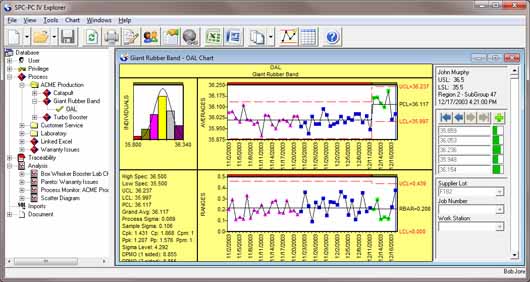
- Incorporate Explorer view interface for managing Process Characteristics and Analyses.
- Improved data storage to secure ODBC-compliant database format, allowing better management of network data, decreased potential for file corruption due to network instabilities, and easier navigation by users.
- Increased security of user access, including ability to limit access of nearly each and every function to specific classes of users. Provides variety of optional security features for CFR compliance, including timed auto logoff, access denial based on failed login attempts, and mandated password expiration.
- Added analysis features, including Box-Whisker and Pie charts, as well as Process Monitor charts for real-time summary of Process Capability and Control assessments for your key processes!
- Appy colors and symbols to plotted groups based on Traceability Field vaues to evaluate stratified or Short Run data.
- Rapid analysis of Excel data, with option to link and save charting properties.
- Export to MS Word for creating and storing customized reports, including Certificates of Analysis. Integrates with Word's templates to ensure consistent and fully-customizable look and feel.
- Easy export to Excel for portability of data to others. Recipients using our SPC IV Excel software can even edit the analysis within MS Excel!
- Linked data may be analyzed using multiple control limit regions
- Subgroup definition based on Traceability Field contents.
- Ability to drill-down on Traceability Fields in Analyses.
- Each characteristic, as well as each Process or Part, may have a unique Note and Image associated with them, allowing for a simple instructions to be relayed to data entry or analysis personnel. In addition, an unlimited number of documents (such as work instructions, flowcharts, CAD drawings, etc.) can be associated with each characteristic or with multiple characteristics.
- Batch Means chart option added to X-Bar charts to monitor processes when subgroups are formed from multi-stream (or multi-cavity) processes.
- Assignable Cause and Correction Action can now be specified for ODBC linked external data sources.
- Stepped Control Limits can be applied to any Characteristic's control chart, such as to display shifts in the process mean or process sigma. Each region can use calculated limits based on all groups in the region, fixed limits based on user-defined UCL, LCL (Normal distribution only), or fixed limits based on another region.
- Plotted groups may be based on calendar months, so only current calendar month is displayed (for example).
- Optional web interface, providing controlled access of specific datasets to off-site sales personnel, as well as customers, using only a web browser.
- Run chart supports overlay of multiple characteristics
Version 4.10
Release Date 9-03
- When both the Auto Save feature and the Make Backup Copy feature are used for a given file, then a backup copy of the file is also created when the file is autosaved.
Version 4.02
Release Date 2-03
- Improved skewness and kurtosis calculations
- Updated gage support (Real-time Gage Module)
Version 4.01
Release Date 10-02
- Added ability to define the subgroup size based on date (or any other column)
- Improved the information passed to an executable file as part of Alerting
- Added option to Preferences dialog for determining prompts when opening chart files or data files with ODBC links
Version 4.0
Release Date 3-00
- Added ability to open Excel files directly.
- Added right mouse button features to Spreadsheet, and expanded the right mouse menu for the Chart window.
- Added drag/drop for column width in Spreadsheet
- Added Gage Linearity Analysis
- Added start-up wizard
- Added context-sensitive Help buttons in each dialog box and window
- Added an option (in Preferences) for having the Edit bar on it's own bar
- Added support for the Starrett 761-2P multiplexer.
Version 3.7
Release Date 1-00
- Added Gage R&R Analysis. New analyses include: Repeatability, Reproducibility, Bias (Accuracy), Performance, Linearity, and Stability.
- Added QA-Flow. New features include Flowcharts, Cause & Effect Diagrams, and Tree Diagrams.
- Added ability to import files from DOE-PC IV
Version 3.64
Release Date 11-99
- Chart displays Chart query statement.
- The advanced Xbar and X charts display the term "user defined" when user-defined control limits are applied.
- Process Capability Charts display a numeric label for the Mean if the “Show Lines = Average” option is selected in the Chart Format Options dialog.
Version 3.63
Release Date 1-99
- Ability to automatically run a program if an alert
condition is met. Users can write executables to perform a multitude
of functions, such as running command line mail senders, sounding bells,
running wave functions, or signaling to external devices such as CNC's,
PLC's, or databases. This function is enabled using a new interface
for a Run line command in the Alert Condition Details dialog box.
- Ability to show upper spec, lower spec, and nominal
lines on run chart. Enabled alerting in run charts, specifically for:
Group average; Observation; Observation above upper spec; Observation
below lower spec; Standard run tests (tests 2, 3, 4); User defined run
tests (tests B, C, D)
- A list of the enabled Run Tests appears on the statistics
for charts supporting Run Tests.
- The ability to attach one or more files (such as procedures,
CAD drawings, flowcharts, etc.) to a given chart analysis or data file
column in the Analysis Options dialog box. Attachments may be opened
from a new button in the tool bar and from the File | Attachments menu
command.
- Italian language support
Version 3.62
Release Date 7-98
- Add support for up to 32 com ports in the gage DLL dialog.
- Ability to define the printed subgroups for a Summary control chart. In the Print dialog box, "Show Groups" FROM and TO allow users to specify a continuous range of subgroups to be plotted.
Version 3.61
Release Date 1-98
- JPEG: Supports JPEG output. Now you can display your SPC-PC IV charts on your organization's website.
- Support for file-based data collector
- Added new DDE macro commands
Version 3.6
Release Date 10-97
- Year 2000 Compliance
- Improved Multivariate analysis to: allow up to 1000 variables
Provide T squared and SPE (Squared Prediction Error) control charts
Provide Loadings chart to identify process variables' effect on selected Principal Component
Provide Score Contribution charts to determine which process variable contributed to a shift in the T2 chart when the subgroup selected is an out of control group in the T2 control chart.
Provide Error Contribution charts to determine which process variable contributed to a shift in the SPE chart when the subgroup selected is an out of control group in the SPE control chart.
Version 3.5
Release date 12-96
- Open Database Connectivity (ODBC): The ODBC
Query Feature allows you to import existing data from any other ODBC
compliant software package. SPC-PC IVs ODBC provides read only
access to database formats common to the health care, service and manufacturing
industries.
- Multiple Chart Print: Provides the capability
to print up to eight charts on a single page, improving your ability
to make comparisons between multiple sets of information.
- 32-bit Version: Introduction of a 32-bit version
of SPC-PC IV
Version 1.0
Release date 6-91
|
|