QA Inc.
QUALITYAMERICA.COM we're worth your visit!
QP Inc.


SPC Software Selection Guide


Statistical Process Control, simplified using SPC software, is a primary analysis tool of quality improvement. Control Charts were initially developed by Walter Shewhart in the 1920's, so they are sometimes referred to as Shewhart charts. W. Edwards Deming popularized their use in the 1980's, and current applications are found in healthcare and transactional services, as well as manufacturing and chemical processes. Popular control charts include the XBar chart and the Individual X chart for measurement data, and the c, u, nP and P charts for attribute (count) data. Follow this link to learn more about why you should use control charts to increase Customer Satisfaction.

Since 1983, Quality America has been a leading software provider for the quality practitioner. Thousands of clients worldwide have improved their processes with our Statistical process control software products.

SPC Explorer RT
The optimal Statistical Process Control software solution, offering the benefits of three packages in one!
  • Enhanced Explorer View with cascading folders to manage your process data, analyze external data (such as Excel or database files), and maintain reports! Data entry can also be easily automated using standard (Excel VBA, VB, Access, etc.) scripting tools.
  • Easy to use Work Set view for real-time data entry through keyboard, electronic equipment and barcode readers!
  • A secure web interface, requiring only a browser, for distributing information to your customer-base, your supply-chain, or your representatives in the field. Even supports data entry!
QA-Active SPC
The Custom Solution
  • An ActiveX control used by Software Developers to integrate SPC analysis into customized applications.
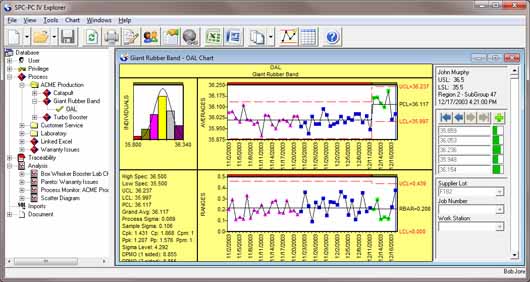
SPC-PC IV
A spreadsheet package designed primarily for off-line analysis.
  • A powerful analysis and reporting tool that can import data from spreadsheets and databases and display a wide variety of easy-to-read control charts.
  • Data may be stored in .qdb spreadsheet files or any ODBC-compliant database or spreadsheet (such as Excel).
SPC IV Excel
Fast, easy, affordable control charting software
  • An Excel COM Add On that combines the power of SPC analysis with the simplicity of Microsoft© Excel.


Which SPC Software is right for you?

Use the Statistical Process Control Software Decision Tree, created using our Green Belt XL software, to determine which of our SPC software packages best fit your needs.

See Analysis Features for a listing of each product's chart analyses.

See the Comparison Matrix for a listing of each product's functionality.

SPC Software Selection chart
 

Analysis Features

The following table summarizes the chart analyses available in each of Quality America's SPC packages:

Return to top.

SPC-PC IV  

QA-ActiveSPC
SPC IV Excel / Green Belt XL

SPC Explorer RT

Variable Data Analysis
Individual-X/Moving Range
reddot.gif
reddot.gif
reddot.gif
reddot.gif
X-bar/Range
reddot.gif
reddot.gif
reddot.gif
reddot.gif
X-bar/Sigma
reddot.gif
reddot.gif
reddot.gif
reddot.gif
Histogram
reddot.gif
reddot.gif
reddot.gif
reddot.gif
Capability Analysis
reddot.gif
reddot.gif
reddot.gif
reddot.gif
Moving Average/Moving Range
reddot.gif
reddot.gif
reddot.gif
reddot.gif
Moving Average/Moving Sigma
reddot.gif
reddot.gif
reddot.gif
reddot.gif
CuSum
reddot.gif
EWMA
reddot.gif
Multivariate Control Charts
reddot.gif
Autocorrelation Function
reddot.gif
Gage Repeatability
reddot.gif
reddot.gif
reddot.gif
Gage Reproducibility
reddot.gif
reddot.gif
reddot.gif
Gage Bias (Accuracy)
reddot.gif
reddot.gif
reddot.gif
Gage Performance
reddot.gif
reddot.gif
Gage Linearity and Stability
reddot.gif
reddot.gif
reddot.gif
Attribute Data Analysis
p Charts
reddot.gif
reddot.gif
reddot.gif
reddot.gif
np Charts
reddot.gif
reddot.gif
reddot.gif
reddot.gif
c Charts
reddot.gif
reddot.gif
reddot.gif
reddot.gif
u Charts
reddot.gif
reddot.gif
reddot.gif
reddot.gif
General Data Analysis
Run Charts
reddot.gif
reddot.gif
reddot.gif
reddot.gif
Pareto
reddot.gif
reddot.gif
reddot.gif
reddot.gif
Regression (Scatter Diagram)
reddot.gif
reddot.gif
reddot.gif
reddot.gif
Short Run Analysis
reddot.gif
Process Monitor Chart
reddot.gif
Box-Whisker Chart
reddot.gif
reddot.gif
reddot.gif
Bar Charts
reddot.gif
reddot.gif
Pie Charts
reddot.gif
reddot.gif
Real-Time Gage Module
Optional
   
Included

Comparison Matrix

The following matrix details some of the differences among these packages:

Return to top.


SPC-PC IV


QA-ActiveSPC

SPC IV Excel *


SPC Explorer RT

Environment
Stand-alone Windows application
ActiveX Developer's Tool
MS Excel COM Add In
Stand-alone Windows application
MS Vista Compliant?
No
N/A
Yes
Yes
Data Storage
Data & analysis options stored in QDB files. Also opens Excel and text files, and links to (ODBC) databases.
Defined by Developer

Microsoft Excel

Data & analysis options stored in SQL Server or Access database (provided). Also opens or links to Excel, text or ODBC databases
Data Entry & Access
Linked or imported databases or files, Keyboard, Electronic instrumentation
Defined by Developer
ODBC using Excel, Keyboard
Linked or imported databases or files, Keyboard, Electronic instrumentation
Data Viewing
Spreadsheet
Defined by Developer
MS Excel Spreadsheet
Spreadsheet, Customizable Data Entry Forms
Pre-defined Data Entry Options
Uses file templates for establishing columns in data entry spreadsheet.
Defined by Developer
None
All aspects of data entry, charting and process alerting may be defined in advance for simple "login and go" access for data entry personnel
Access Control
Partial
Defined by Developer
None
Every feature and function
Alerting of Process Problems
Partial, when logged into software
Defined by Developer
None
Immediate feedback to Data Entry personnel; Emails to any valid address; Customizable based on condition for each chart. Real-time Monitoring of multiple processes provided.
External Reporting
JPEG, Printed Reports
Defined by Developer
JPEG
Web, Customizable Printed Reports
Customizable
No
Yes
No
Yes
External Document Retrieval
Files may be attached for access
Defined by Developer
None
Files may be attached for access, and version controlled
Cost per User
$595 Single/
$400 - $550 multiple users
$2000 develper plus first 5 users/
$200 per user thereafter
$199 Single/
$50 - $125 multiple users
$595 Single
$225 - $495 multiple users
(web and network)

* Except Pricing, also applies to Green Belt XL.

Return to top.

See also:

(SPC) Statistical Process Control chart concepts

SPC Training Materials for self-study or instructors

SPC articles


Search | Site Map | Privacy | About Us

Copyright © 1995-2005 Quality America Inc. All Rights Reserved