SPC-PC IV Explorer
We developed the first SPC software for MS-DOS (1983) and MS Windows (1991). Our longevity in developing innovative SPC software is a testament to our dedication to working with our customers to improve their operational efficiency. This SPC Software streamlines your process data management & reporting:
- Manage process data with cascading folders grouped by customer, department, product, etc.
- Password-protected concurrent-use licensing controls access to features.
- Quickly analyze data entered via keyboard, or imported or linked from Excel or other sources such as your SAP, ERP, or LIMS databases.
- Automated data entry from electronic gaging is supported in the optional Work Set view.
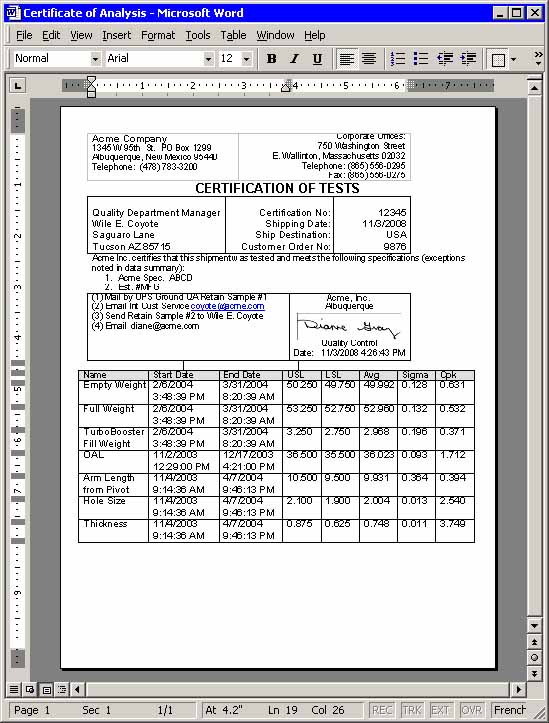
- Create customized reports using Word templates that contain charts, statistics, raw data or other information as needed, or use the optional Web SPC Software for customized reporting throughout your supply chain.
- Annotate and use color or symbols on charts to identify stratification patterns.
- Quickly filter your data based on any of your traceability fields.
- Optional Web SPC interface for reporting, data entry & process monitoring throughout your supply chain with no local installation required.
- Optional Calibration Management including all the features available in QA-Calibrate
SPC Control Charts & Statistical Analysis Tools
Features for control chart analysis and reporting of your key processes include:
- X-Bar Chart with Range chart or Sigma chart.
- Individual X / Moving Range chart with control limits based on Normal or Non-Normal distributions.
- Moving Average charts with Moving Range, Range or Sigma Chart.
- Attribute Charts (NP, C, U, and P charts) and Run charts.
- Batch Mean (aka "Between/Within") chart option to analyze multiple process streams.
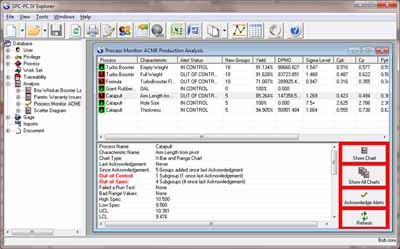
- Process Monitor dashboard displays to conveniently track your key process indicators in real-time. Use these with external data to send alerting emails when the process violates any pre-defined conditions.
- Multiple control regions on control charts to show process shifts. Each region's control limits based on data (all or portion); user-defined levels; or another region.
- Remove a selected subgroup from the chart and/or the calculations using the right mouse menu, or use the Autodrop option to automatically remove out of control groups from control chart calculations.
- Process capability statistics provided with control charts and Histograms using Normal or Non-normal distributions.
- Easy to use Show Chart with Filter option to filter data by date or any other traceability field, or options to stratify data (by color/shape) for interpretation of patterns.
- Plot Last x Groups/Days/Months option.
- Subgroup by Variable Size (to support missing data); Fixed Sized; or, by a specified Traceability Field.
- Calculated parameters, based on single or multiple data characteristics .
- Control critical document revisions & attach active version to control chart for easy access by process personnel.
-
Scatter Diagrams with Regression to investigate the strength of the linear relationship between two variables.
-
Normal Probability Plots to verify normality of process data.
-
Box-Whisker Plots to compare the location and variation of various processes or categories of products or services.
-
Pareto Diagrams to distinguish the critical few from the trivial many. Use Stacked Pareto option to break down each category even further!
-
Autocorrelation charts to identify the serial dependence of current data on previous data.
- Other multi-characteristic analyses include Bar, Pie and Overlay Charts.
Pricing & Options
Pricing starts at $1195 for network or stand-alone installation. Discounts are available for multiple user licenses. All licenses are perpetual-use (so they never expire) and concurrent-use (so you only use a license when you're in the software).
Your purchase of SPC software licenses include all the following benefits for the first twelve months from date of purchase, and afterwards with renewal of our optional maintenance plan:
- 30-day satisfaction guarantee
- Our premium technical support, including web conferencing as needed and access to our resident SPC expert Paul Keller.
- Free upgrades! See What's New!
- Free web conference training sessions for you and your colleagues covering all aspects of software setup, functionality and management to ensure your organization gets the most from its SPC software implementation.
- 10% discount on all of our online training courses, including SPC certification.
Optional SPC software features include:
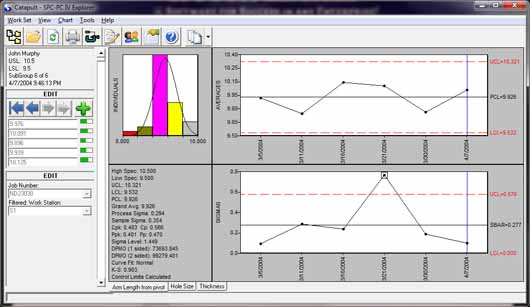
- Work Set View (shown here): This popular feature provides customized templates used to simplify data entry for your process personnel using keyboard, bar code readers or electronic gauging, with alerting via email, text message and on-screen prompts when the process violates predefined conditions.
- Optional SQL Server back-end. See System Requirements.
- 21 CFR Part 11 Features for regulated industries provides:
- Audit Trails of all data editing;
- Auto-logoff after specified period of inactivity;
- Password expiration;
- Login denial after specified number of failed login attempts (with notification to designated administrator);
- Documentation including scripts and calculations used for validation.
- Manage gage calibration and R&R studies directly in SPC-PC IV Explorer by purchasing discounted licenses of QA-Calibrate.
- Web Interface for secure management or customer oversight of remote facilities.
Need more information on control chart software? Download a free SPC software trial, or contact our Sales staff for more details or to schedule a personalized web presentation.